

Altitude Cache Purging
What is Caching?
Caching is a technique where we store frequently used data in temporary storage - a cache. This prevents the need to fetch data from the original source and reduces server load.
Suppose a user visits the home page of a website. Without caching, content for the web page would need to be fetched each time a user lands on the page - this would be costly. By caching the assets for the page, users can reach the site very quickly and server load is reduced.
A developer then makes a change to the website, e.g. putting an item on sale that will be highlighted on the home page. Since the content is cached, users would still be served the old version of the site without the sale. This could result in customers missing the sale and reduced revenue for the company. Thus, we need a way of clearing the cache when changes are made or content is out of date. This is called cache purging.
Cache Purging on Altitude Platform
On Altitude Platform, we have six types of cache purging:
- Path Purging: Purge specific paths, such as ‘/products/books/’, with the option to purge the cache of all paths that contain ‘/products/books/’ as a prefix. Users can also specify purging the path attached to specific domains with the default option purging the path on all domains on a specific environment.
- Domain Purging: Purge all content cached for a specific domain.
- Global Purging: This clears all cached content for an environment.
- Key Purging: This is a very targeted type of cache purging where specific content is targeted using its surrogate keys.
- Redirects Purging: Clear content for redirects - users have the option of clearing cache of all redirect rules for an environment or purging specific rule groups.
- Experimentation Purging: Purge the cache associated with an experiment.
Ways to use Altitude Cache Purging
We have two ways of engaging with the cache purging feature. Users can use the Altitude Platform API Cache Purge endpoint - see example below. This allows users to integrate cache purging into their CI/CD pipeline, removing the need for manual management of the cache.
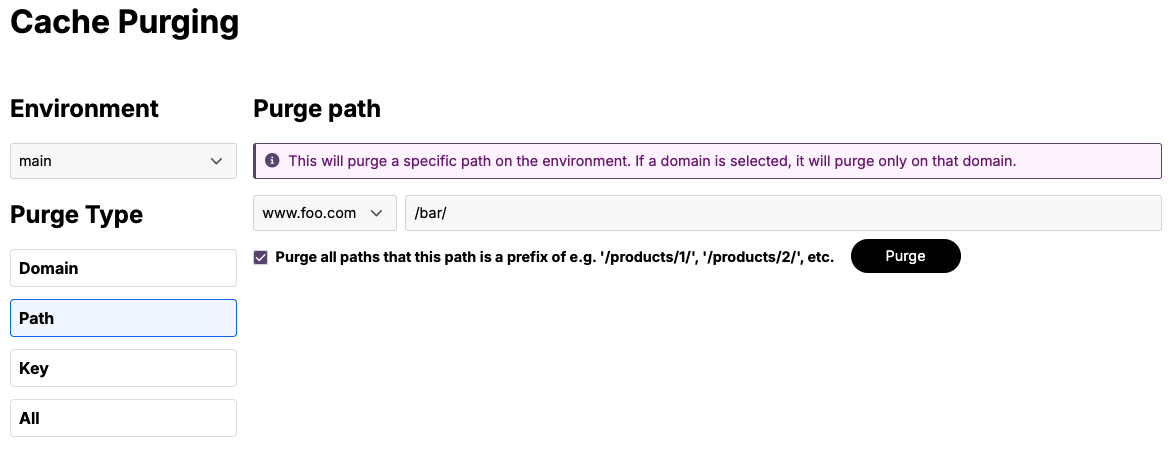
Example: Purging the path ‘/bar/’ on domain www.foo.com with prefix purging enabled:
curl -i --location 'https://api.platform.thgaltitude.com/v1/sites/:siteId/purge-cache/:envName' \
  --header 'Accept: application/json' \
  --header 'Content-Type: application/json' \
  --header "Authorization: Bearer $token" \
  --data '{
    "purgeType": "path",
    "domainName": "www.foo.com",
    "path": "/bar/",
    "prefix": true
  }'
Users can also use the Altitude Platform UI, which provides a user-friendly way to do path, domain, global, and key purging.
For more detail on how to use cache purging for your site deployed on Altitude Platform see the Altitude Platform cache purging docs.