
Background
Experimentation, also known as A/B testing is a technique used to serve different experiences to visitors, and compare metrics in each experience group to evaluate which variants improve your metrics.
Implementation
Altitude platform supports experimentation, but currently only on e-commerce sites. The e-commerce tooling can be used to configure experiment names, values and ratios, which will automatically feed through to sites running on altitude platform.
The implementation computes experiment groups on the edge, so edge caching is still possible when experiments are running. Customer’s experiment groups are automatically added to the CDN cache key (you don’t need to specify this in your altitude.yaml).
When experiments are running on your site, the http header x-altitude-experimentation is passed to all your origins, with the following format:
experiment_1_domain:value_1<:campaign_id>,experiment_2_domain:value_2<:campaign_id>,...
e.g.
category_button_above_main_banner_www.myprotein.ie:v1|campaign:155615,personalised_recommendations_www.myprotein.ie:c|default
Note that the campaign ids are optional.
In your client code, you should parse this string, and produce different experiences as appropriate. Set the cache-control headers as you would normally — platform ensures the experimentation buckets do not affect each other.
Previewing Experiments
Experiments can be previewed by adding a previewExperimentsquery parameter to a site’s url. This will override the normal experiment allocation described above.
Using the UI
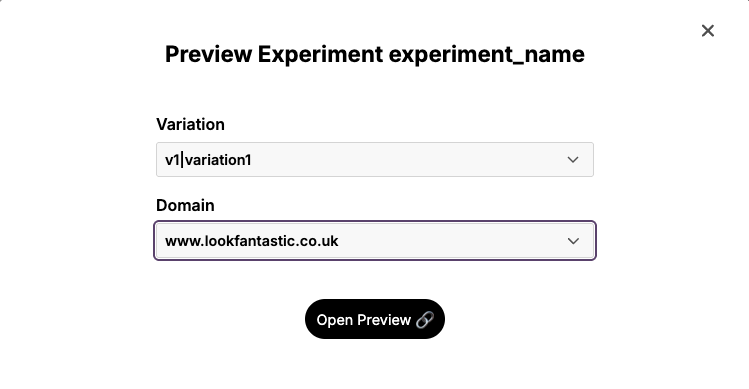
The Altitude UI’s Experimentation tab displays a table of all the experiments for a site. Against each experiment is a link to preview the experiment.
- Navigate to the “Experimentation” tab.
- Select the environment from the list on the left.
- Click the ‘View’ button against the experiment you wish to preview
- Select the domain and experiment variant from the drop downs
- Open the preview link by clicking “Link”
Constructing URLs manually
The URL flag should be in the format <experiment_name>;<variant_name> and will look something like:
?previewExperiments=basket_progress_bar_experiment;v1|progressBar
You can extend with multiple experiments separated by a +:
?previewExperiments=basket_progress_bar_experiment;v1|progressBar+homepage_experiment;v2|new_template
Note that the query parameter will only accept the following special characters: +;_|
Sticky behaviour
Using the previewExperiments parameter will start a ‘sticky’ session. This means that the experiment will continue to be applied as you navigate around the site. The session uses the chumewe_user as the cache key.
- The experiment will continue to be applied even if the flag is no longer in the URL e.g after navigating to a new page or searching.
- The session will expire 15 mins after the first click. After this, a new experiment will be allocated according to whatever experiments are naturally running.
- If a new
previewExperimentsflag is set, that will take affect right away and start a fresh 15 minute session. - If you want to stop previewing an experiment before the 15 min expiration, change the value of your
chumewe_usercookie. This will start a new session and a new experiment will be allocated in the usual way.